
How to Create a Viral Talking Baby Podcast with AI: Step-by-Step Guide
Introduction
AI talking baby podcast videos are spreading fast across TikTok, YouTube, Instagram, and other social media platforms. In these videos, a baby sits in front of a podcast microphone and talks about work, dating, money, family life, or even interviews someone like a mature podcast host. This strong contrast is funny and unexpected.
You may want to create one for fun, ride a social trend, grow a short-form account, or make more shareable promotional content for a brand. The hard part is knowing how to start. Which tool should you use? How should the script sound? How do you make the mouth movement match the audio? And how do you make the result feel more like a viral clip instead of a random AI video?
This tutorial will walk you through the full process step by step. You will learn what an AI talking baby podcast video is, what to prepare before generating one, how to create it with MindVideo AI, how to write prompts, and some tips for making it more engaging. We will also provide script ideas and AI prompt examples you can use directly to help you create your own talking baby podcast video faster.
What Is an AI Talking Baby Podcast Video?
An AI talking baby podcast video is a short video created with AI. It usually features a baby sitting in a podcast scene, facing a microphone, wearing headphones, and speaking like a real podcast host. The appeal is not only that the baby can talk. The real hook is the contrast. The image is cute, but the wording and attitude feel mature. This conflict between a cute visual and adult-style expression makes the video more likely to keep viewers watching. You can build episodes around ideas like Baby CEO Podcast, Baby Dating Advice, Baby News, or Baby Reviews Everything.
What You Need to Create One Baby Podcast Video
Before you create an AI talking baby podcast video, prepare a few key elements. They will shape how natural, funny, and watchable the final clip feels. See the table below:
|
Element |
What You Need |
Why It Matters |
|
Publishing Idea |
A clear theme or series angle, such as Baby CEO, Baby Relationship Advice, or Baby News. |
A repeatable idea helps you create more than one random video. |
|
Script |
A short 15-second script with a strong opening line, clear contrast, and a simple punchline. |
The script decides whether viewers keep watching. |
|
Baby Character |
A baby character in a podcast scene. You can transform an existing image or generate a new host from a prompt. |
The character is the first thing people notice, so it affects clicks, retention, and recall. |
|
Voice or Voiceover |
A clear, expressive voice. It can be AI-generated or recorded by you. |
The voice gives the character personality and strengthens the baby-with-adult-attitude contrast. |
|
AI Video Generator |
A tool that can make the baby image talk with lip sync or image-to-video generation. |
This turns a still character into a talking podcast clip. |
Prompt: Turn a Normal Baby Image into a Podcast-Style Baby Host
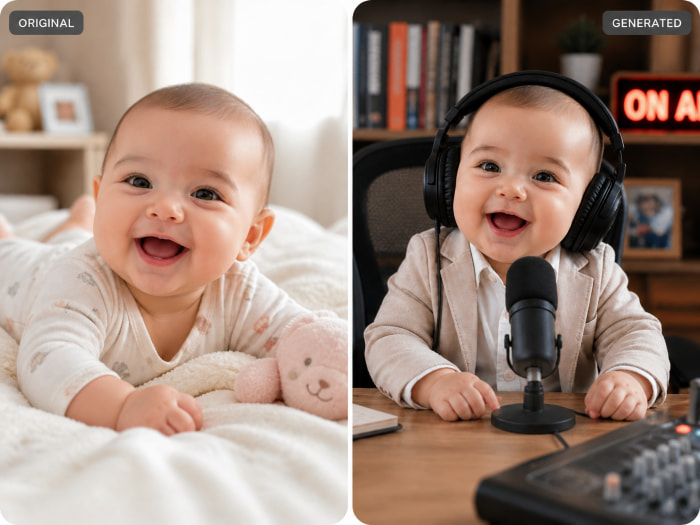
If you already have a baby image, you can use the prompt below to turn it into a podcast-style character image:
Use the reference image as identity verification. Preserve the authenticity of the subject's face, hair, skin texture, and proportions. Create a photo of [uploaded character] seated at a desk or table, wearing [large over-ear headphones / a formal outfit], with a small microphone placed clearly in front as if participating in a podcast, news broadcast, or recording session.
The subject should look like they are speaking or about to speak, with a natural, lively expression and a slightly open mouth. In the background, add [bookshelf / stuffed animals / studio screen / product displays / cozy room details]. Use soft natural light or warm studio lighting, with a softly blurred background and shallow depth of field. The image should feel [cute / cozy / professional / lively], crisp, and ultra-high definition.
You can replace the outfit and background details based on the style you want. For a softer baby podcast look, use stuffed animals and cozy room details. For a more formal show, use a bookshelf, studio screen, or product display.
Prompt: Generate Podcast-Style Baby Photo from Scratch
You can also generate a baby podcast host from scratch with AI. Here is a basic prompt:
Create an image of a cute baby podcast host sitting in a modern podcast studio, wearing professional headphones, speaking into a studio microphone, sitting behind a clean podcast desk, warm cinematic lighting, playful realistic expression, lifelike style, high detail.
When writing this kind of prompt, do not stop at “a baby podcast host.” Describe the subject, outfit, accessories, facial expression, action, pose, scene, background details, lighting, and visual style. For a news-style video, you might add “news broadcast set, studio screen in the background, formal outfit, professional lighting.” For an ecommerce-style clip, use “product displays on the desk, colorful livestream background, energetic expression.” The more specific the visual direction is, the easier it is to create an image that works for a talking video.
When writing this kind of prompt, it's best to describe the key details clearly. Describe the subject, outfit, accessories, facial expression, action, pose, scene, background details, lighting, and visual style. If you want a news broadcast style, you can add “news broadcast set, studio screen in the background, formal outfit, professional lighting.” For an ecommerce-style clip, use “product displays on the desk, colorful livestream background, energetic expression.”
How to Create a Viral Talking Baby Podcast with MindVideo AI
Before you start, prepare your baby podcast host image, a short script, and either an audio file or a voice script. In MindVideo AI, you can create a talking baby podcast video in two main ways. The first method is better when you want accurate mouth movement and clean audio sync. The second method is better when you want more creative motion, richer expressions, and stronger scene direction.
Method 1: Use the Lip Sync Tool for Better Mouth Movement
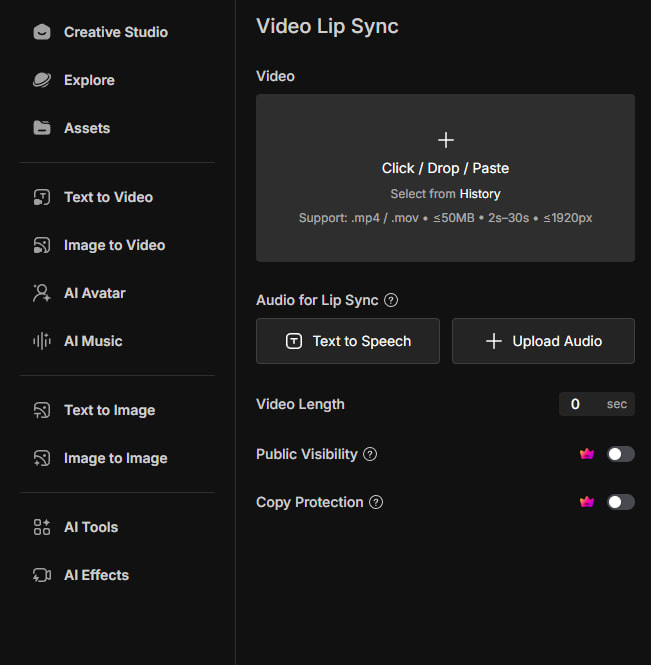
If your main goal is to make the baby’s mouth movement match the voice, start with the lip sync tool. This method is a steady choice for podcast-style talking clips. It works best when the character uses simple expressions and light body movement. If you want big gestures or very dramatic action, image to video will give you more room to experiment.
If you care more about whether the baby’s mouth movement looks natural and matches the audio, start with the lip sync tool. This method is a steady choice for podcast-style talking clips. It's more suitable for adding simple expressions and light body movement to the character.
Steps:
1.Open the MindVideo AI lip sync tool.
2.Upload your baby podcast host image.
3. Upload your prepared audio, or generate an AI voice.
If you generate the voice inside the tool, click text to speech and enter your voiceover script. Keep the lines short and easy to follow. You can also add pause markers between sentences, such as <#0.5#>, to make the character pause for 0.5 seconds. A short pause can make the joke land better and help the clip sound more like a real podcast moment. Then choose a suitable voice, and adjust the volume and emotion mode as needed.
4.Add a prompt that describes the baby’s expression, simple gestures, camera rhythm, and overall tone.
5.After the character image, audio, and prompt are ready, click "Generate". MindVideo AI usually creates the talking baby video in a few minutes, but the exact time can vary based on script length, video duration, and current platform traffic.
Reference prompt:
The baby looks serious but funny, as if giving adult advice on a podcast. Use subtle eyebrow movements, small nods, and a slightly dramatic expression while speaking.
When the video is ready, preview it before downloading. Check whether the mouth movement matches the voice, the expression feels natural, and the face is clear. If the result feels off, simplify the movement prompt, shorten the script, or regenerate with a clearer voice.
Method 2: Use Image to Video for More Creative Motion
If you want the baby host to have richer actions, expressions, and scene performance, use the image to video tool. This method gives you more creative control. You can describe what the baby says, how the expression changes, when the baby moves, and how the camera behaves.
It's important to note that the result depend on the model you choose. Some models are stronger at motion and camera movement, while a dedicated lip sync tool is usually more reliable for precise mouth movement.
Steps:
1. Open the MindVideo AI image to video tool.
2. Choose a model that works well for talking characters, such as Seedance 2.0 or MindVideo 2.0.
3. Upload your baby podcast host image.
4. Write a complete prompt with the full script. Include what the baby says, what action happens at each time point, how the expression changes, and what the camera should do.
5. Choose the video ratio, duration, resolution, and other settings.
6. Click Generate and wait for MindVideo AI to create the video.
A good image-to-video prompt should be specific. Tell the AI when the baby speaks, what the baby does, what the facial expression looks like, and what style the scene should keep. For example:
Create a vertical short-form video of the baby podcast host sitting at a desk in a modern podcast studio.
0-2 seconds: The baby looks directly at the camera with a serious expression and says, "Welcome back to my podcast. Today, we need to talk about nap time."
3-6 seconds: The baby leans slightly toward the microphone, raises one hand a little, and says, "Adults call it burnout. Babies call it bad scheduling."
7-10 seconds: The baby nods confidently, smiles a little, and says, "Honestly, a two-hour nap could fix half of corporate America."
Keep the baby seated behind the desk, with professional headphones and a microphone clearly visible. Use warm studio lighting, subtle camera movement, natural facial expressions, and a funny but lifelike podcast style.
The key is to connect the script, timing, gestures, and camera direction in one prompt.
Script Ideas and AI Talking Baby Podcast Prompts
To create an AI talking baby podcast video that people want to watch, start with a clear theme and a strong contrast. Here are useful theme directions:
● Baby CEO Podcast: productivity, meetings, management, nap time, and burnout.
● Baby Relationship Advice: dating, red flags, boundaries, and breakups.
● Baby Money Podcast: saving, rent, credit cards, and financial freedom.
● Baby Work-Life Balance Podcast: emails, stress, long workdays, and adults refusing to rest.
● Baby News Podcast: internet drama and everyday adult problems in a news-anchor tone.
● Baby Product Review Podcast: bottles, toys, gadgets, or lifestyle products.
● Baby Therapy Podcast: calm life advice for overwhelmed adults.
● Baby Parenting Commentary: the baby reviews parents, sleep loss, and overthinking.
After you choose a topic, you can use or rewrite the prompts below. Each one includes the time, line, expression, action, and scene style.
Example 1: Baby CEO Podcast
Create a 15-second vertical video of a cute baby podcast host sitting behind a desk in a modern podcast studio. The baby wears large over-ear headphones and speaks into a studio microphone like a serious business podcast host. Use warm studio lighting, natural facial expressions, subtle head movements, and a funny but lifelike podcast style.
0-2s: (Camera slowly zooms in on the baby. The baby looks directly at the camera with a serious expression.) "Welcome back. Today, we need to talk about productivity."
2-5s: (Baby leans slightly toward the microphone and raises one hand like a CEO making a point.) "Adults call it burnout. Babies call it bad scheduling."
5-9s: (Baby nods confidently, keeping a serious podcast-host face.) "A two-hour nap could fix half of corporate America."
9-12s: (Baby glances at the microphone, then looks back at the camera with a tiny smile.) "That is not laziness. That is strategic recovery."
12-15s: (Baby gives a confident little nod.) "Follow me for more executive baby advice."
Example 2: Baby Relationship Advice Podcast
Create a 15-second vertical video of a cute baby hosting a relationship advice podcast. The baby sits at a cozy podcast desk with headphones and a microphone, speaking like a confident dating coach. Use soft warm lighting, a softly blurred background, natural mouth movement, and subtle facial expressions.
0-2s: (Baby looks serious, slightly raises the eyebrows, and leans toward the microphone.) "If they only text you after midnight, listen carefully."
2-5s: (Baby tilts the head with a knowing expression.) "That is not romance. That is poor time management."
5-8s: (Baby makes a small hand gesture, as if explaining something important.) "I have bottle time, nap time, and emotional boundaries."
8-12s: (Baby nods slowly and looks directly at the camera.) "If I can respect a schedule, so can they."
12-15s: (Baby smiles gently.) "Respect your calendar. Even babies know that."
Example 3: Baby Money Podcast
Create a 15-second vertical video of a cute baby hosting a money podcast. The baby sits behind a clean desk with headphones and a studio microphone, speaking like a tiny financial advisor. Use a modern podcast studio background, warm cinematic lighting, subtle hand gestures, and natural facial expressions.
0-2s: (Baby looks into the camera with a serious financial-advisor expression.) "Today, we are talking about financial freedom."
2-5s: (Baby nods slowly and leans closer to the microphone.) "I personally have no income, but I do have investors."
5-9s: (Baby glances to the side, then back to the camera.) "They are called parents, and they are emotionally overleveraged."
9-12s: (Baby raises one hand slightly, like explaining a business strategy.) "That is what we call early-stage funding."
12-15s: (Baby gives a confident little smile.) "Subscribe before my next funding round."
Example 4: Baby Work-Life Balance Podcast
Create a 15-second vertical video of a cute baby podcast host sitting in a modern studio, wearing headphones and speaking into a microphone with a calm, wise expression. Keep the camera steady, use warm podcast studio lighting, natural blinking, and a funny but sincere podcast tone.
0-2s: (Baby looks directly at the camera with a calm, wise expression.) "Adults keep asking how to find work-life balance."
2-5s: (Baby tilts the head slightly, looking thoughtful.) "Have you tried crying for five minutes and then taking a nap?"
5-8s: (Baby raises one hand gently, like giving life advice.) "That is not a breakdown. That is a reset."
8-12s: (Baby leans toward the microphone with a serious face.) "You cannot heal while answering emails in bed."
12-15s: (Baby smiles softly and nods.) "You are welcome. Next question."
Example 5: Baby News Podcast
Create a 15-second vertical video of a cute baby news-style podcast host sitting behind a desk with a microphone and headphones. Add a studio screen in the background and professional broadcast lighting. Use crisp details, subtle camera movement, natural expressions, and a funny serious-news style.
0-2s: (Camera zooms in slightly. Baby looks serious like a news anchor.) "Breaking news: adults are still pretending they are not tired."
2-5s: (Baby leans toward the microphone with a concerned expression.) "Experts recommend water, sunlight, and not checking email in bed."
5-9s: (Baby raises one hand slightly, as if reporting an important update.) "Sources say a nap would also help, but adults remain in denial."
9-12s: (Baby looks down briefly, then back at the camera.) "This situation is developing."
12-15s: (Baby nods with a professional news-anchor expression.) "This has been Baby News. Stay hydrated."
Example 6: Baby Product Review Podcast
Create a 15-second vertical video of a cute baby hosting a product review podcast. The baby sits at a desk with headphones, a microphone, and small product displays in the background. Use bright studio lighting, colorful ecommerce-style background details, natural facial expressions, subtle hand gestures, and a playful product-review style.
0-2s: (Baby looks excited and waves one tiny hand at the camera.) "Today, I am reviewing this bottle."
2-5s: (Baby points slightly toward the desk with a serious reviewer expression.) "Design: simple. Function: life-changing."
5-8s: (Baby nods thoughtfully and looks at the microphone.) "The user experience is smooth, especially at 3 a.m."
8-12s: (Baby leans forward like giving a final verdict.) "I tested it under extreme conditions, also known as bedtime."
12-15s: (Baby smiles brightly.) "Final rating: five naps out of five."
A simple formula works well: clear theme + strong first-two-second hook + single-host podcast dialogue + simple expression and movement + clear visual style. Avoid too many gestures or scene changes. Keeping the baby seated at the podcast desk usually gives a cleaner, more stable result.
Tips to Make Your Talking Baby Podcast Feel More Viral
Start with the strongest line in the first 1-2 seconds
Short-form viewers decide quickly. Do not open with a long setup. Start with a line that shows the joke right away, such as "Adults call it burnout. Babies call it bad scheduling." A strong line tells viewers why they should keep watching.
Keep the video focused
One video should cover one joke, one point, or one scene. If you have more ideas, turn them into separate episodes. A focused clip is easier to finish watching and easier to repeat as a series.
Make the baby expressive, but keep movements simple
Large body movement, fast waving, turning away from the desk, or frequent pose changes can make AI video less stable. Small nods, eyebrow movement, slight hand gestures, leaning toward the microphone, eye contact, tiny smiles, and natural blinking are usually enough.
Add large, readable captions
Many viewers watch short videos without sound. Captions help them understand the joke and follow the rhythm. Use readable text, keep each line short, and avoid covering the baby’s face or microphone.
Create a recurring character or mini-series
If you want to grow an account, do not make only one random clip. Keep the character, voice, scene, and series name consistent. A repeatable format makes it easier for viewers to remember you and expect the next episode.
Learn from proven viral videos, but add your own twist
Study talking baby podcast videos that already perform well. Look at their scene setup, opening line, gestures, pacing, and caption style. Do not copy the exact script, character, or concept. Use the structure, then add your own topic, opinion, and style.
Use trending topics and social media memes
You can also build scripts around platform trends, memes, and current conversations. A baby CEO can comment on workplace trends. A baby news host can explain internet drama. A baby therapist can respond to popular relationship topics. Keep the character consistent so the account still feels focused.
Create Your Talking Baby Podcast with MindVideo AI
Now you know how to prepare a baby podcast host image, write a short script, choose between lip sync and image to video, and improve the hook, movement, and style of your clip.
If you want to create your own AI talking baby podcast video faster, try MindVideo AI. Upload your baby host image, add a script or audio, describe the expression and movement, and generate a short video for TikTok, Reels, or Shorts.
Ready to start? Create Your Talking Baby Podcast Video with MindVideo AI.
FAQ
Can I create a talking baby podcast video with AI?
Yes. You can use an AI image generator to create a baby podcast host, add a script or voiceover, and use lip sync or image-to-video tools to make the baby appear to speak.
How do I make a baby image talk with AI?
Use a lip sync tool. Upload the baby image, add your audio or generate an AI voice from text, then describe simple expressions and movements. The tool will generate a video where the baby appears to talk along with the voice.
What do I need to create an AI talking baby podcast?
You need a baby podcast host image, a short script, a voice or voiceover, and an AI video generator. It also helps to prepare a clear theme and podcast-style scene details before generating the video.
How long should a talking baby podcast video be?
For short-form platforms, 15 seconds is a good starting point. It is long enough for a hook, a core joke, and a punchline, but short enough to keep the clip tight and easier to generate.
What makes an AI talking baby podcast feel viral?
A viral-style clip usually has a strong hook in the first 1-2 seconds, a funny contrast between the baby character and adult-style dialogue, clear captions, simple natural movement, and a short punchline.
Can I post AI talking baby podcast videos on TikTok or YouTube?
Yes, you can post them on TikTok, YouTube, Instagram, X, and other platforms as long as you follow each platform’s rules. Do not use real children’s photos without permission, and do not clone someone’s voice without consent. If needed, label the content as AI-generated.
Can I use a real baby photo for an AI talking video?
Only use a real baby photo if you have clear permission from the parent or legal guardian. For public content, an AI-generated baby character or an image you fully own is usually safer.
