Free AI Golden Ratio Face Calculator: for Facial Proportion Analysis

Upload a clear front-facing photo and let MindVideo AI analyze your facial proportions, feature balance, and golden ratio match in seconds. You do not need any background in facial aesthetics. The report gives you a clear view of your facial harmony at a glance.

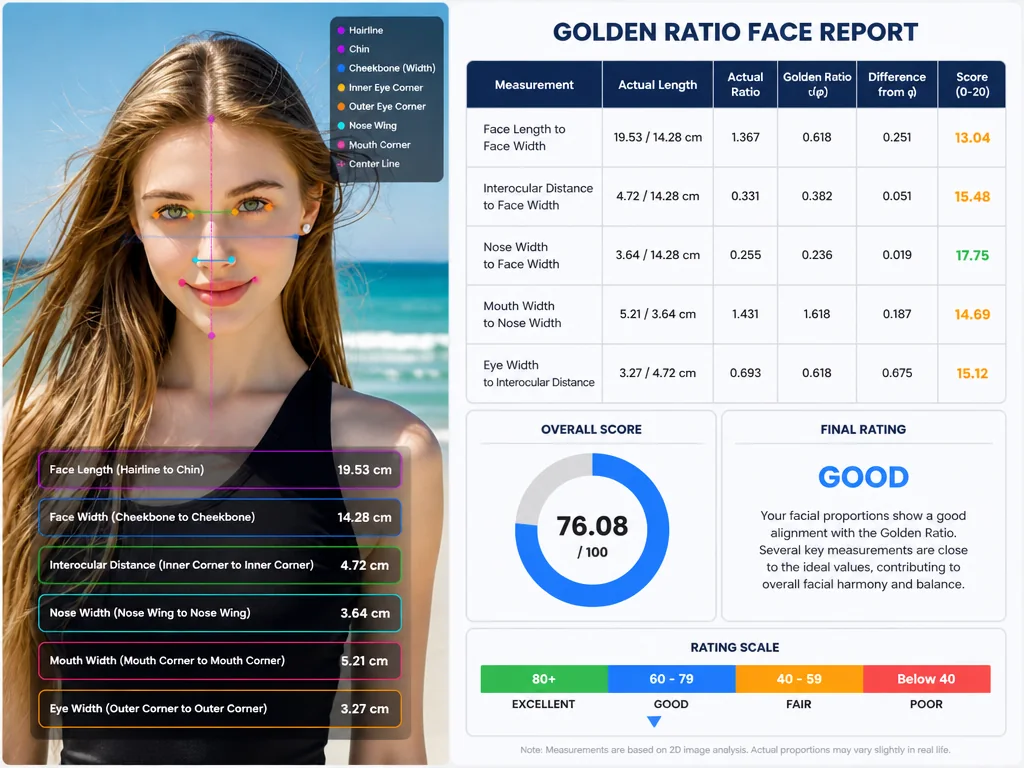
AI Golden Ratio Face Calculator interface showing a marked face report and harmony score
4.7/5 Join 13,068 users who have used MindVideo Golden Ratio Face Calculator

Upload Your Photo to Start Your Golden Ratio Face Analysis

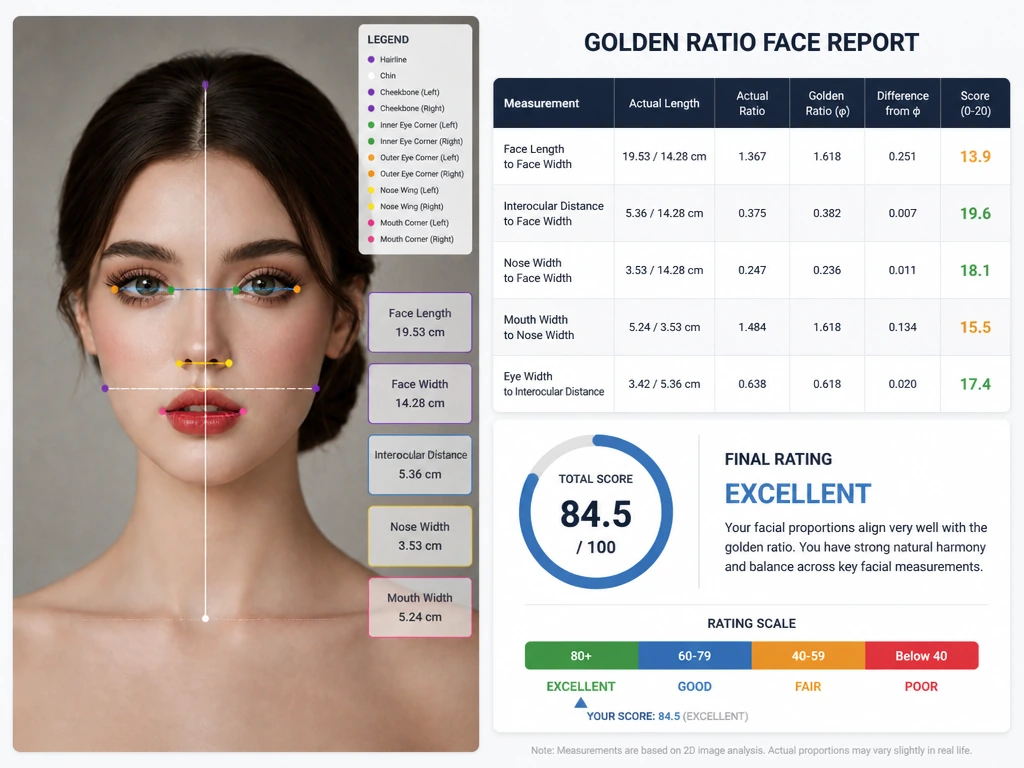
Result

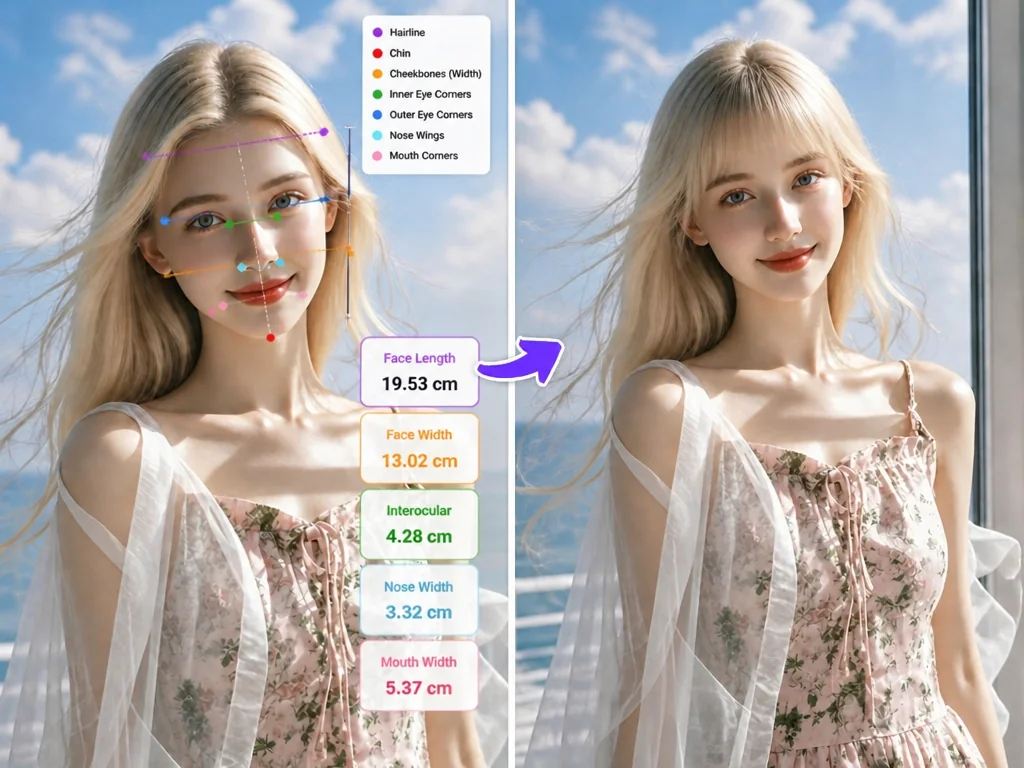
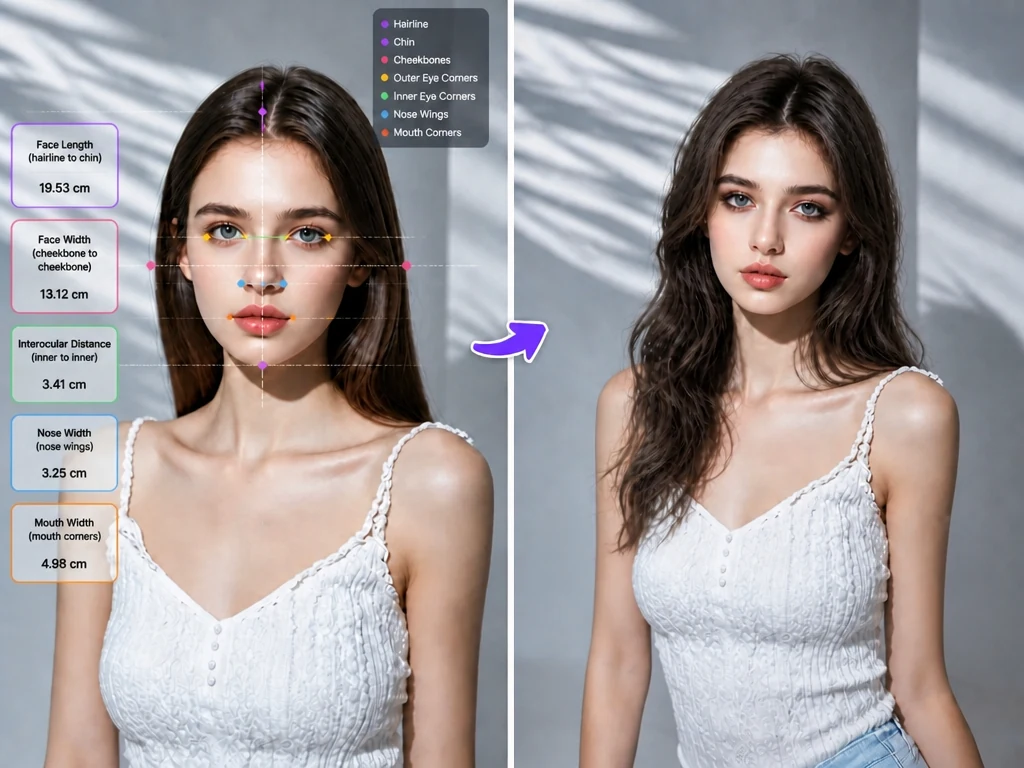
AI Golden Ratio Face Calculator result with facial landmarks and proportion score

What Is the Golden Ratio Face?

The golden ratio is often written as the Greek letter φ and is approximately 1.618. In simple terms, it appears when a line is divided so that the ratio of the whole length to the longer part is the same as the ratio of the longer part to the shorter part.

You can find this proportion in nature and design, from spiral shells and sunflower seed patterns to classical architecture and visual art. It later became a reference in facial aesthetics, where it is used to study the relationship between face length, face width, and the spacing of facial features.

In facial analysis, the φ reference is not a strict rule for beauty. It is a visual reference that helps you understand your facial balance. Real faces rarely match every ratio reference perfectly, and that is completely normal.

Below are some of the common facial proportion references used as visual comparison points in this analysis.

Facial ProportionReference RatioWhat It Means
Face length to width1.618 : 1A common golden ratio reference for overall facial shape and balance.
Facial thirds1 : 1 : 1Compares the forehead, midface, and lower face to see if the vertical sections feel balanced.
Eye spacing1 : 1 : 1Checks whether the space between the eyes is close to the width of one eye, part of the classic fifths idea.
Mouth to nose width1.618 : 1Looks at the visual relationship between mouth width and nose width.
Lower face balance1.618 : 1Looks at the relationship between the nose base, lips, and chin.
Lip volume balance1 : 1.618A reference for the visual balance between the upper and lower lips.

These ratios do not define your attractiveness. They simply give the AI a set of reference points to map your features against the golden ratio and help you understand your unique facial proportions.

What You Get From Your Golden Ratio Face Analysis

MindVideo AI creates a Golden Ratio Face Analysis from your uploaded photo. It does not beautify, reshape, or idealize your face. Instead, it identifies visible facial landmarks and turns AI-estimated 2D measurements into a facial proportion report.

The analysis uses key facial landmarks to estimate core measurements and compare facial ratio relationships with the reference ratio. This gives you a visual reference for how different proportion points relate to one another in your photo.

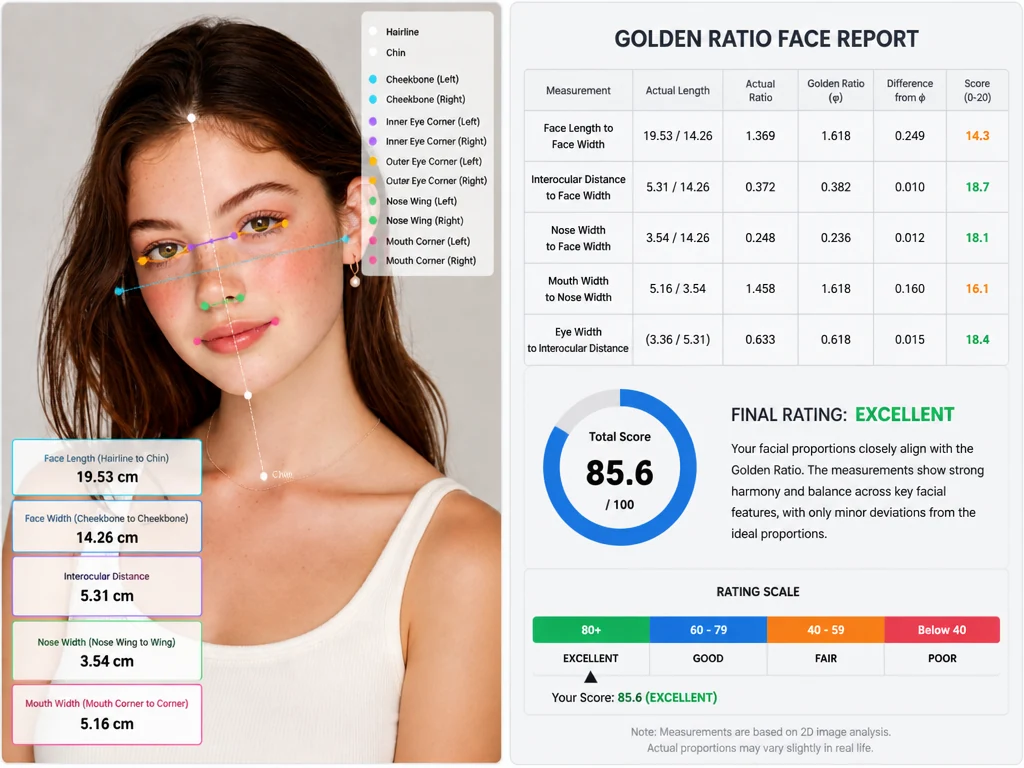
Facial proportion report preview with 2D measurements and golden ratio comparison table
  • Marked facial analysis with estimated 2D measurements: See measurement lines, colored landmark dots, and AI-estimated values including face length, face width, interocular distance, nose width, and mouth width.
  • Golden ratio comparison table: Compare proportions like face length to face width, interocular distance to face width, nose width to face width, mouth width to nose width, and eye width to interocular distance.
  • Per-ratio difference summary: Each ratio shows how far it is from the φ reference and receives a score from 0 to 20.
  • Overall proportion score: Get a total score from 0 to 100 based on the AI-estimated facial ratios in your photo.
  • Reference result band: The report also groups your result into a reference band to help you read the ratio differences more quickly.
  • Short result summary: Read a simple explanation of where your face matches the proportion reference closely and where small differences appear.
Note: Your score is a facial proportion reference, not a beauty judgment. Beauty is personal, cultural, expressive, and much more than any single ratio. Use the result as a fun way to understand facial balance, not as a measure of your attractiveness.

How to Test Your Face's Golden Ratio with AI in 3 Steps

Upload a photo, click generate, and review your face ratio report in seconds.

1

Upload a clear front-facing photo

Choose a photo with natural lighting and a fully visible face. For a more accurate result, face the camera directly, keep a natural expression, and make sure your facial features are clearly visible. Avoid heavy shadows, sunglasses or other accessories that cover large parts of the face, extreme high or low camera angles, and obvious beauty filters.

2

Click generate and let AI map your face

Click the generate button. Our tool will detect key facial landmarks and estimate core facial measurements from your uploaded photo. It then turns these values into facial ratios for the golden ratio comparison.

3

Review your golden ratio face report

In a few seconds, you will see a marked report that summarizes your facial ratio comparisons, score, and result band. You can use it as a visual reference for personal styling ideas or as a starting point before a consultation.

Why Use MindVideo AI Golden Ratio Face Calculator?

Clear, readable results

The report combines a marked facial image, facial ratio comparisons, and a simple scoring summary in one place. You can quickly see how the key proportion points in your photo relate to the φ reference.

Analyzes your real facial features

The tool generates your facial proportions without beautifying, reshaping, or idealizing your face. The result is based solely on the features visible in your uploaded photo.

Privacy-conscious photo analysis

Your uploaded photo is used only to generate your golden ratio face analysis. We do not share, permanently store, or reuse your image for other purposes.

There's More You Can Do With Your Face Ratio Result

Choose Hairstyles That Balance Your Facial Proportions

Instead of saving random haircut ideas and guessing what might work, use your report as a starting point for styling direction. It can help you spot whether your face may look better with more softness, more side framing, or a stronger sense of vertical flow. That makes it easier to filter hairstyle ideas before you commit to a cut.

  • If your face looks longer in photos: You may want to explore styles that add softness or visual width around the midface, such as soft fringe, layered shapes, or volume at the sides.
  • If your face looks shorter or wider in photos: You may prefer styles that create a more elongated visual flow, such as longer layers, softer face-framing pieces, or light lift through the top.
Hairstyle planning board using facial proportions to choose softer framing and volume
Makeup placement ideas guided by a golden ratio face test and facial balance notes

Get Makeup Tips Based on Your Golden Ratio Face Test

Stop blindly copying looks that were designed for someone else's features. Your golden ratio face test helps you decide where to place visual focus based on your own proportions. For a longer-looking face, horizontal blush and softer eye definition can bring attention back to the midface. For a wider-looking face, light contour and subtle center highlights can make facial lines look cleaner in photos. Eye spacing can guide small but useful details, such as where to place eyeliner, lashes, or inner-corner definition.

Use Your Golden Ratio Face Report as a Cosmetic Reference

Use your golden ratio face report as a reference before a cosmetic, dental, or facial contour consultation. It can make your conversation more specific and easier to explain. Please note that MindVideo AI does not provide medical advice or treatment recommendations. Use the report as a starting point for discussion, not as a decision-making tool. Any real-world procedure or adjustment should be discussed with a qualified professional who can assess your face in person.

Golden ratio face report prepared as a visual reference for a consultation discussion

FAQ About AI Golden Ratio Face Calculator

What is an AI Golden Ratio Face Calculator?

An AI Golden Ratio Face Calculator analyzes a front-facing photo and estimates how your facial proportions compare with the golden ratio reference. MindVideo AI marks visible facial landmarks, estimates 2D measurements, compares facial ratios, and generates a personal harmony score.

Is your AI Golden Ratio Face Calculator really free?

Yes. You can use our Golden Ratio Face Calculator without a paid membership. Free credits are available through activities such as daily check-ins, sharing, and inviting friends.

How accurate is the golden ratio face analysis?

The result is based on AI-estimated 2D photo measurements, so it should be used as a visual reference rather than an exact real-life measurement. Camera angle, lighting, facial expression, lens distance, and image quality can all affect the score.

What kind of photo should I upload?

Use a clear, front-facing photo with natural lighting, a visible face, and no heavy shadows, strong face coverings, extreme camera angles, or obvious beauty filters.

Will your Golden Ratio Face Calculator change or beautify my face?

No. Our tool does not reshape, smooth, beautify, or idealize your face. The tool is designed to read the visible facial proportions in your uploaded photo while keeping your original identity intact.

Is my uploaded photo safe?

Yes. Your photo is processed only to generate this analysis. MindVideo AI does not share, permanently store, or reuse your image for other purposes.

Does a low golden ratio score mean I am not attractive?

No. Your score is a facial proportion reference, not a beauty judgment. Beauty is personal, cultural, expressive, and much more than any single ratio. Use the result as a fun way to understand facial balance, not as a measure of your attractiveness.

Why do different photos give different results?

Different photos can produce different scores because 2D facial analysis is affected by angle, lighting, expression, distance from the camera, hairstyle, and filters. If you want a more consistent result, upload a clear front-facing photo with your face centered and features clearly visible.

Does the tool work for different genders, face shapes, and skin tones?

Yes. The analysis is based on visible proportion relationships in your photo, so it is designed to work across different genders, face shapes, and skin tones.

What will I get after uploading my photo?

You will get a marked facial analysis image, AI-estimated 2D measurements, facial ratio comparisons, item scores, a personal harmony score, a final rating, and a short explanation of your result.

Can I use the result for hairstyle or makeup ideas?

Yes. Your report can help you understand whether your face may visually benefit from more width, more length, softer framing, or a different focal point. You can use it as a reference for hairstyle ideas, makeup placement, profile photos, or creative visual planning.

Can I use this report for cosmetic or dental consultation?

You can use the report as a visual reference before a cosmetic, dental, or facial contour consultation. It may help make the conversation more specific. However, MindVideo AI does not provide medical advice or treatment recommendations. Any real-world procedure should be discussed with a qualified professional in person.

Ready to See How Your Face Matches the Golden Ratio?

Upload a front-facing photo and get your facial proportion report in seconds. Free credits are available to get started.

Your photo is analyzed only for this report and is not used for beautification or other purposes.

Join MindVideo AI official community on Discord.