
How to Create AI SouEnd Effects: The 2026 Step-by-Step Tutorial & Prompt Guide
Have you ever struggled to find the perfect sound effect for your video or blog? Or found traditional sound libraries too expensive and complicated? Don’t worry! Today, I’ll walk you through how to create sound effects using AI—it’s much easier than you might think! In this chapter, you’ll learn four simple steps to create sounds from scratch, along with some tips to make them sound even better.
What Is an AI Sound Generator
An AI sound generator is a cutting-edge intelligent tool that uses artificial intelligence to create, modify, and enhance sound effects for various fields, including music, gaming, video production, and content creation. It’s like telling a story to the AI, which then transforms that story into sound.It allows users to:
● Generate sounds instantly: No waiting required—the powerful AI creates unique audio clips based on your text prompts.
● Create online for free: Enjoy a free, intuitive interface that lets you quickly browse the platform and select the perfect custom sound effects.
● Skip the recording equipment: Say goodbye to microphones and recording devices—save time and effort.
● Produce high-quality audio: Get professional-quality sound effects in under a minute.
How to Create Your First AI Sound Effect with MindVideo
MindVideo allows you to generate high-quality, diverse AI sound effects online for free based on text prompts. The step-by-step tutorial below will guide you into the wonderful world of sound creation. You’ll soon have your first AI sound effect—the process is simple and straightforward.
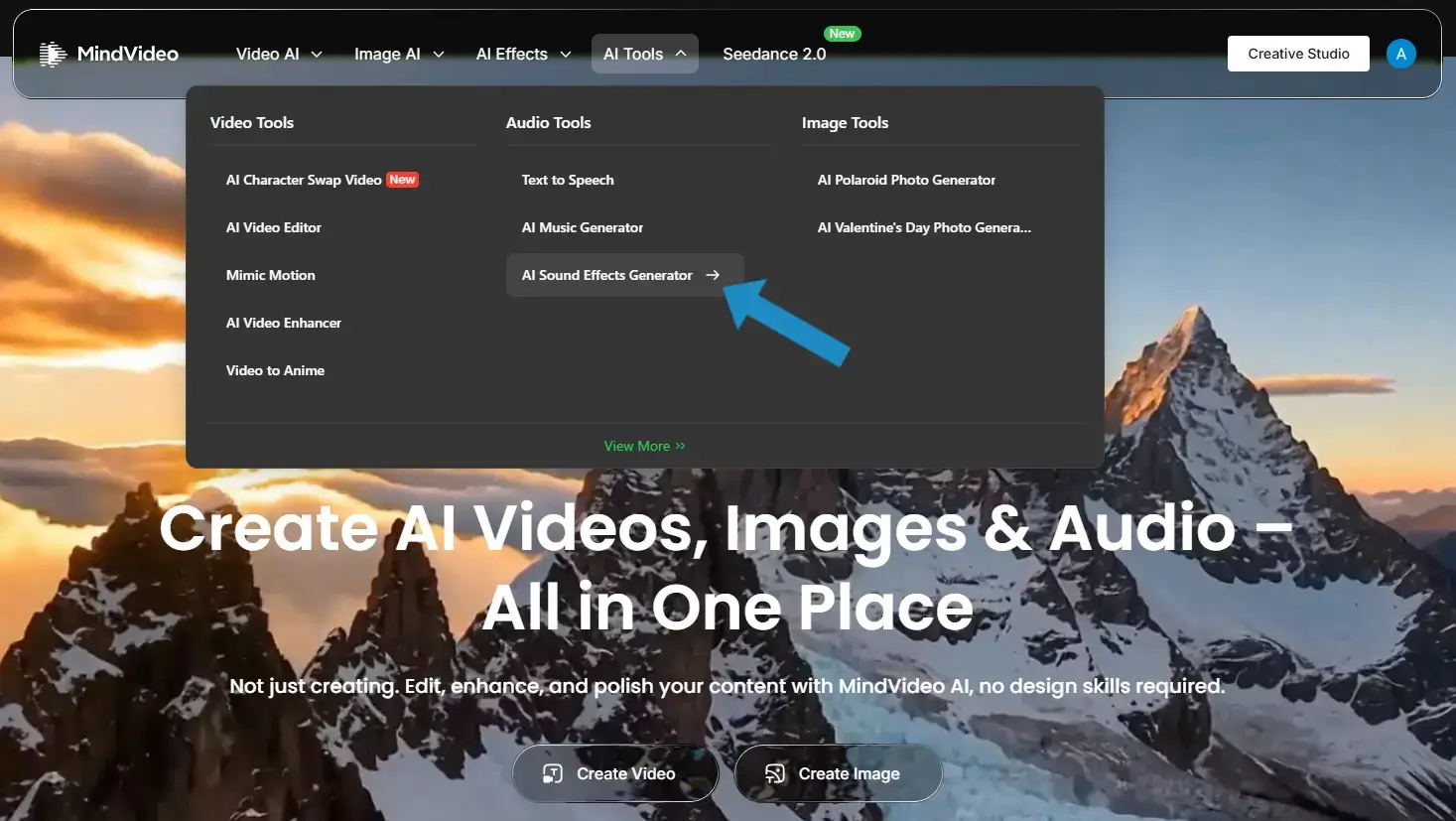
● Step 1: Open the AI Sound Generator
Locate "AI Sound Generator" under "AI Tools" in the toolbar and click it.
● Step 2: Describe the Sound Effect You Want
Enter a description of the sound effect you need in the text box. For best results, include specific details. Here are a few examples to inspire you:
Nature / Soothing: “I want to hear the sound of cicadas chirping on a grassy plain; it should be quiet and soothing.”
Sci-Fi / Cinematic: “The engines of a massive spaceship start up with a deep rumble, accompanied by a metallic resonance.”
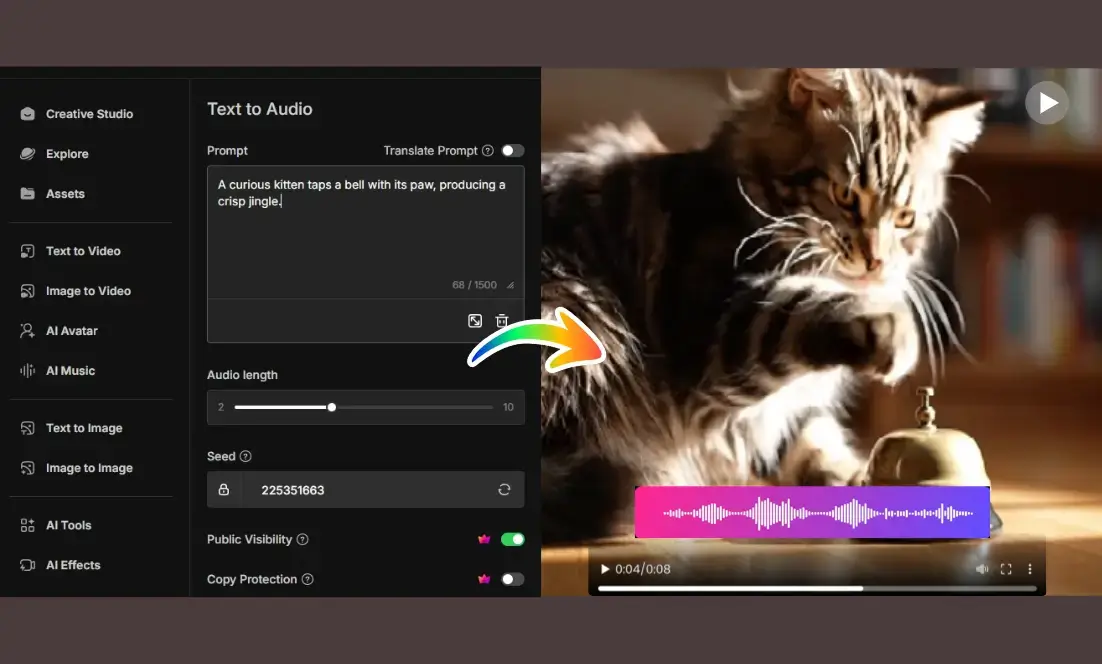
Cartoon / Playful: “A curious kitten taps a bell with its paw, producing a crisp jingle.”
● Step 3: Adjust Parameters and Generate
Freely adjust the desired audio duration, then click the “Generate” button.
● Step 4: Download and Use
After one minute, preview the sound effect to ensure it meets your expectations. If not, revise the description. Once satisfied, download the high-quality sound effect and use it.
Advanced Tips: How to Write Effective Prompts for AI Sound Effects
Generating AI sound effects is easy, but making them sound realistic requires some know-how. A good prompt is like a precise command that allows the AI to understand exactly the sound you have in mind.
Master the Universal Sound Effect Prompt Formula: Subject + Action + Environment + Style
For best results, try to include the following four elements in your description:
● Subject: Who or what is making the sound? (e.g., a dog, a robot, rain)
● Action: What are they doing? (e.g., barking, walking, falling)
● Setting: Where is it happening? (e.g., in a small room, on a tin roof, in a vast cave)
● Style: How does it sound? (e.g., muffled, distant, high-pitched, cartoonish)
Let’s look at a clear comparison of the results:
Basic Prompt:
“The sound of a car.”
With this simple description, the AI might generate any car sound, resulting in highly random outcomes.
Advanced Prompt:
“A fast sports car crashes into a wall, with the sound of shattering glass and metal—realistic and loud.”
By adding the scene and materials, the sound immediately gains unique spatial reverberation and dramatic tension. These textual details help the AI better understand exactly what kind of sound you want.
Recommended Modifiers for AI Sound Effect Prompts
To help spark your creativity when applying formulas, adding modifiers can help your sound effects better achieve the desired results. Here, we’ve compiled a list of commonly used modifiers across three categories.
1. Spatial and Environmental Terms
These determine reverb and a sense of space.
● Recommended Modifiers: echoing, underwater, distant, indoor.
● Practical Example: Take “footsteps” as an example. Adding environmental modifiers creates: “Footsteps echoing in a damp cave” (with dripping water and reverberations) VS “Footsteps crunching on dry autumn leaves” (full of the texture of fall).
2. Material and texture descriptors
These determine the clarity and emotional tone of a sound.
● Recommended descriptors: low-pitched, high-pitched, muffled, crisp, metallic, digital.
● Practical Example: Consider two "door-closing" sounds: "the creaking sound of a heavy wooden door closing slowly" (filled with suspense) VS. "the metallic clang of an old iron door" (rough and powerful).
3. Action and Process Words
These determine the narrative quality of the sound effect.
● Recommended Adjectives: exploding, dripping, burning, howling, shattering, buzzing.
● Practical Example: Take “the sound of wind”—“the gentle rustling of leaves in a breeze” (calm and pleasant) VS “the howling of a gale rushing through window cracks” (immediately creates a sense of tension).
If you want a deeper understanding of how to create AI sound effects from simple text, this guide will provide you with an even more comprehensive perspective.
Hands-On Tutorial: Creating Cinema-Quality Sound Effects with AI
What are sound effects? Simply put, they are the sounds added during post-production that sync with the on-screen action—such as footsteps, doors closing, and the rustling of clothing. In the past, this required professional sound effects artists and props, but now all you need is AI. To give you a firsthand look at the power of AI-generated sound effects, we’ve compiled three practical examples of common cinematic scenarios:
1. Footsteps and Movement (Shaping Character Traits)
Footsteps are the most basic form of sound design; different types of shoes and surfaces can instantly convey a character’s identity and surroundings.
● Prompt 1: “A woman in high heels walks across wooden planks, her footsteps echoing clearly.”
● Prompt 2: “Soldiers in heavy boots march in formation across muddy ground.”
2. Clothing and Fabric Friction (Enriching Emotional Detail)
The sounds of clothing often convey a character’s personality and current state of action.
● Prompt 1: “A person quickly slips on a heavy leather jacket, accompanied by the sound of the zipper snapping shut and the rustle of leather.”
This instantly creates the image of a capable, handsome character.
● Prompt 2: “The soft, flowing rustle of a silk robe as it moves.”
This is ideal for portraying elegant, mysterious, or luxurious characters.
3. Interaction Between Props and the Environment (Driving Plot Atmosphere)
Sounds created by the interaction between people and objects can greatly enhance the sense of immersion in the story.
● Prompt 1: “The sound of raindrops tapping against the car window, heard from inside the vehicle, accompanied by the rhythmic swishing of the windshield wipers.”
This instantly creates a safe, tranquil, or somber atmosphere inside the car.
● Prompt 2: “In a quiet office, a hand quickly rummages through papers on a cluttered desk, producing a rustling sound.”
This conveys a character’s frantic search for something.
● Prompt 3: “A hand slowly turns a rusty metal doorknob, emitting a grating squeak.”
This is a classic horror movie sound effect—now you can generate it with just one sentence.
See? You don’t need any props or a microphone to create realistic sound effects!
Frequently Asked Questions (FAQ)
Q1: Is the AI Sound Generator Free to Use?
Yes! MindVideo’s AI sound generator is free to use and available to everyone. You can earn points by checking in daily to generate and download sound effects. If you have more advanced needs, you can join MindVideo’s membership program.
Q2: Do I Need to Download Software? Or is It an Online Service?
It’s completely online! All you need is a browser—no software downloads required. You can start creating anytime, anywhere.
Q3: Are the Generated Sound Effects Royalty-Free?
Yes! Every sound effect created using MindVideo’s AI Sound Generator is 100% royalty-free. You can use them for both personal without worrying about licensing fees or attribution requirements.
Q4: How Fast is the Generation Process?
Very fast! Typically, it takes less than a minute from the moment you click “Generate” until the sound effect is ready.
Conclusion
By now, you’ve learned all the basics of how to create AI sound effects, from choosing the right tools to crafting professional prompts. Go ahead and give it a try—get ready to embark on your sound creation journey!
