
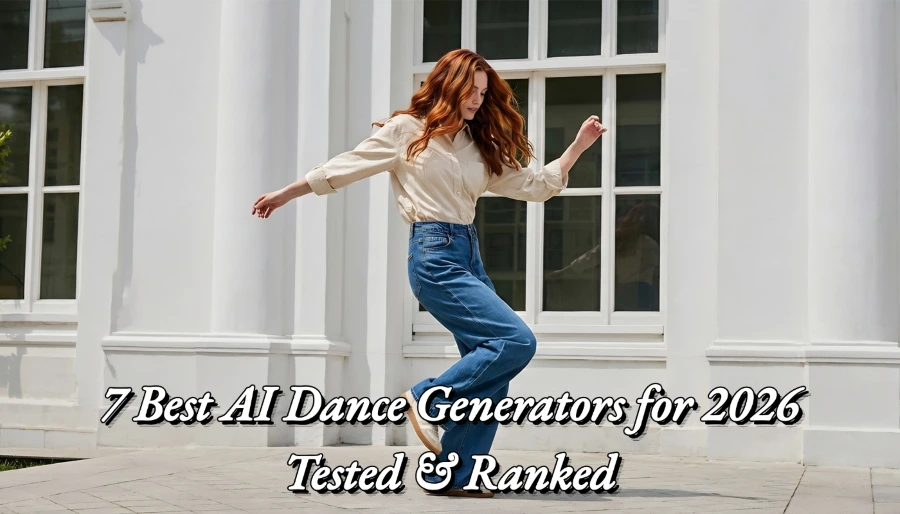
7 Best AI Dance Generators for 2026 - Tested & Ranked
Introduction
If you've opened any social media lately, you've seen them: your friends, celebrities, and even their pets dancing to hit songs with surprisingly realistic motion. These AI dance videos are spreading like a virus, garnering hundreds of millions of views on Instagram and TikTok. Which begs the million-dollar question: how exactly are they made? More importantly, which of the dozens of so-called "AI dance generators" on the market actually work?
As a content creator immersed in the world of AI video tools daily, I was equally confused and curious. So, I decided to dive deep, investing significant time to test them firsthand. Rather than simply skimming through their feature pages, I actually put them to use in real-world creations. This review is not an advertorial, but an honest, battlefield report based on first-hand experience. I'll tell you which tools are great value for money, which are a pure waste of time, and which one best suits your needs.
To ensure the review is fair and objective, I've established a rigorous testing process:
● Test Samples: Over 20 different types of photos, including selfies, photos with friends, photos of my pet Golden Retriever, and several anime character images.
● Test dimensions: I scored each tool on four core dimensions: generation speed (how long does it take to produce a video?), video quality (how smooth and realistic are the movements?), price (does it offer good value for money?), and ease of use (how intuitive is it for beginners?).
● Test Duration: Over 40 hours of in-depth use and comparative analysis.
● Testing Date: All testing in this article was completed in January 2026 to ensure that all information is up to date.
Make A Quick Decision on the AI Dance Generator that's Right for You
Short on time? No problem. Use these two tools below to find your best option in 30 seconds or less.
Interactive Selection
Find your perfect tool in less than 30 seconds:
● [ ] I need: free tools → Recommend MindVideo AI, which has an extensive library of templates and is completely free.
● [ ] I need: the best quality → Recommend Move.ai, which offers unrivaled motion capture accuracy for professional-grade projects.
● [ ] I need: best for on-the-go mobile creation → Recommend AI Danza, the mobile app that puts AI dance creation just a few taps away.
● [ ] I need: commercial use → Recommend DeepMotion for professional-grade motion data that can be used in games and animations.
Quick Reference Table
|
Tool |
Pricing (Starting) |
Speed |
Quality |
Suitability |
|
MindVideo AI |
Free trial; $9.9/month |
⚡⚡⚡⚡⚡ |
⭐⭐⭐⭐⭐ |
All-round choice; suitable for everyone |
|
Viggle AI |
Free trial; $9.9/month |
⚡⚡⚡⚡ |
⭐⭐⭐⭐ |
Social media entertainment |
|
Move AI |
Free trial; $10.5/month |
⚡⚡⚡ |
⭐⭐⭐⭐ |
Professional video production |
|
AI Danza |
Free trial; $14.9/month |
⚡⚡⚡⚡ |
⭐⭐⭐⭐⭐ |
Mobile content creators |
|
DeepMotion |
Free trial; $9/month |
⚡⚡⚡⚡ |
⭐⭐⭐⭐ |
Animators and developers |
|
PXZ AI |
Free trial; $9/month |
⚡⚡⚡⚡ |
⭐⭐⭐⭐⭐ |
Users seeking unique 3D effects |
|
ZMO AI |
$6/month |
⚡⚡⚡ |
⭐⭐⭐ |
Quick turnaround for trending content |
Core Review of the 7 Best AI Dance Generators
MindVideo AI - Best Integrated AI Dance Generator
If you want just one tool for most of your AI dance video creation needs, MindVideo AI is the one that strikes the perfect balance between ease of use, quality and value for money.
My Test Experience
As the first tool in this review, MindVideo AI impressed me. It has a very simple interface with little to no learning curve. I uploaded a front photo of my golden retriever "Lucky" and chose a funny wiggle dance from the template library. The whole process took less than two minutes and the resulting video was ready. To my surprise, even though it was a photo of an animal, the AI still recognized the facial features very well, and the movements matched the rhythm of the music very well. Although a closer look reveals some edge imperfections, it was a huge hit when shared in the family group chat. When tested with photos of people, the results were even more realistic, with the Uncanny Valley effect kept to a minimum.
Core Features
Simple one-click workflow: all you need to do is "upload photo -> select template -> generate". This is great for users who don't want to be bothered by complicated parameters.
● Rich template library (constantly updated): dozens of templates ranging from popular dances to funny moves are included.
● Support for animal photos: This is a big difference between it and many competitors. Most tools fail when dealing with non-human faces, but MindVideo AI is specifically optimized for this and has a high success rate.
Pricing
● Free version: free credit for new users signing up, free credit for signing in every day, with a slight watermark.
● Paid Version: As low as $11/month, unlocks all templates, no watermark, higher resolution and faster queue generation.
● Value for Money Analysis: Considering its features and output quality, this is one of the more cost-effective paid tools on the market.
Pros
✅ Extremely user-friendly interface with zero threshold for newbies.
✅ Extremely cost-effective and low payment threshold.
✅ Animal photo support features.
✅ Consistent quality of output and minimal Uncanny Valley effect.
✅ Promising potential as an all-in-one platform.
Cons
❌ Lack of professional-grade in-depth customization features (e.g., adjusting range of motion).
❌ 3D effects are not as good as specialized tools.
Best for
● Content creators who want to produce high-quality social media content quickly.
● Regular users who want to spice up their lives.
● Small businesses looking for a reliable, cost-effective tool.
![reference image: turning pet photos into AI dance videos [MindVideo AI]](https://static.mindvideo.ai/images/blog/b6daa03c0d74c2e133a02b4a1acb33c3695b75b86ec1c.webp)
Viggle AI - The Most Template-Rich AI Dance Generator
If you want to start with a minimal budget but access the most templates for AI dances and produce content quickly, then Viggle AI is the best choice for you.
My Test Experience
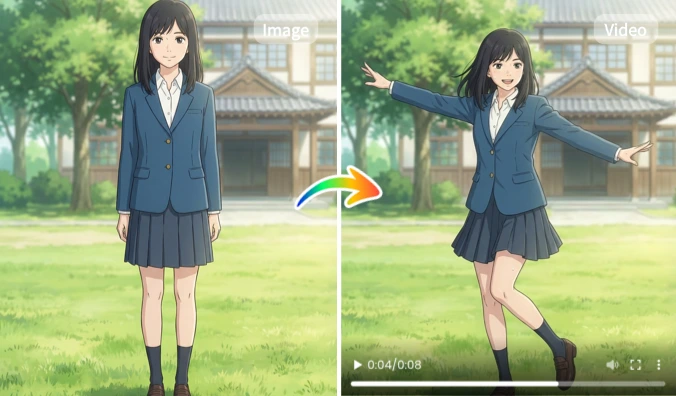
The first thing that struck me about Viggle AI was its "generosity". It runs on Discord and provides an extremely large library of dance templates. I tested it with an image of an anime character to see how well it adapts stylistically. I used the /animate command and uploaded the image and a reference dance video. After a few minutes, it generated a video of an animated character doing the same dance. The results are interesting, the motion is captured mostly well, but the details are a bit fuzzy and the queue can be long during peak server times.
Core Features
● Massive Template Library: Over 5000 dance templates, from K-pop to internet hit memes.
● Video Driven Moves: You can upload a reference dance video and have your static character mimic the moves in it, which offers more freedom than fixed templates.
● Active Community: In the Discord group, you can see what others are creating and get inspired by it.
Pricing
● Free: Almost all core features are free, but there are limits on the number of builds and queue priority.
● Paid Version: Subscription options are available for priority processing and more advanced features.
Pros
✅ Largest number of templates of any tool.
✅ Its video to video motion transfer feature is highly creative.
Cons
❌ Inconsistent rendering times and long waits at peak times.
❌ Output quality is more "entertaining" than "realistic".
❌ Character-motion integration can be unnaturally distorted at times.
Best for
Social media players who want a quick online dance challenge.
Move.ai - Best Output Quality
When budget is no object and you're looking for cinematic motion capture accuracy, Move.ai is the undisputed king.
My Test Experience
Testing Move.ai was more like operating a professional movie and TV setup than a simple app; it requires the use of multiple (6 is the official recommendation) iPhone cameras to capture a person dancing from different angles. The setup process was complicated, but once I followed the instructions, I was shocked at the results. Instead of an effects-laden video, it produces extremely clean and accurate 3D mocap data that can be used in Blender or Unreal Engine. I used it to capture a complex street dance routine, imported it into 3D software and applied it to an avatar, and the fluidity, weight, and detail of the movement almost rivaled that of an expensive optical motion capture studio.
Core Features
● Multi-camera capture: it achieves professional-grade, markerless motion capture using just multiple smartphones, which greatly reduces the threshold of professional motion capture.
● Amazing Accuracy: Whether it's the slightest movement of a finger or the rapid rotation of a body, it can be reproduced with a very high degree of fidelity.
● Professional Workflow Integration: Easily export data to mainstream 3D animation and game development software.
Pricing
● Free: Almost no free credits available.
● Paid: $10.50 per month for individual packages, more advanced packages recommended for teams.
Pros
✅ Leading-edge motion capture quality.
✅ Professional export options.
Cons
❌ Not very cost-effective.
❌ Complicated setup that requires multiple devices and some technical knowledge.
❌ It outputs raw motion data, not a ready-to-share video.
Best for
● Professional animation studios and game developers.
● Movie VFX teams that need top quality motion data.
ZMO AI - Fastest Rendering Speed
In a nutshell: Built for the social media age, its speed is your biggest advantage when you need to keep up with a dance trend immediately.
My Test Experience
The experience was very straightforward, uploaded a photo, chose a popular dance and the video was generated almost as soon as I took a sip of water. The quality shows clear signs of AI and low customization, but the point is that it's fast.
Pros
✅ Extremely fast
✅ Easy to use
✅ Keeps up with the trends.
Cons
❌ Average quality.
❌ Low customization options
❌ Results tend to be patterned
Best for
● Regular users who want to create shareable trendy dance videos in minutes.
AI Danza - Best for App Users
This mobile app simplifies AI dance generation to the extreme, making it a great starter option for beginners and mobile creators.
My Test Experience
Downloading the app on my phone, the whole process is as easy as using a beauty app. Upload a selfie, tap a template, generate, and share, all in one go. It also has a fun facial animation feature that creates short videos of nodding and lip-syncing.
Pros
✅ Mobile native, extremely convenient
✅ Intuitive interface, zero learning cost
✅ Fast rendering speed
Cons
❌ Simple functionality compared to desktop tools
❌ Free version has feature limitations
Best for
● Content creators who like to do everything on their phones and regular people looking for entertainment.
DeepMotion - Best for Professionals
If you're an animator or developer who needs to convert real dance videos into usable 3D animation data, DeepMotion is your best bet.
My Test Experience
I uploaded a video of myself dancing and DeepMotion's cloud-based AI processed it and gave me a very clean FBX animation file. Its motion tracking is very accurate and it even auto-fixed some minor foot-sliding issues. While there is a wait to process long videos, this is a cost-effective option for indie developers to get high-quality motion data.
Pros
✅ Accurate motion tracking
✅ More cost-effective compared to professional motion capture devices
✅ Cloud processing does not take up local computer resources.
Cons
❌ Free version is very restrictive.
❌ Can't handle fine finger movements.
❌ Still requires users to have knowledge of 3D software to work with the data.
Best for
● Indie game developers, animators, and small studios that need reliable motion data.
PXZ AI - Most Unique Features
Instead of a simple video overlay, it generates a realistic 3D avatar dancing, providing a unique visual impact.
My Test Experience
Uploading a selfie and seeing a 3D version of me dancing, with great lighting and textures, was the first tool that made me say "How is this possible? This is the first tool that made me go "How is this possible? However, the facial expressions can be a bit stiff at times, creating a "valley of horror" effect, and overly complex movements can cause the model to make mistakes.
Pros
✅ Unique photo-to-3D dance technology
✅ Stunning visual effects
Cons
❌ Obvious watermarks in the free version
❌ Occasional uncanny valley effect
❌ Limited ability to handle complex poses.
Best for
● Creators who want to produce eye-catching, scroll-stopping content.
AI Dance Generator Side-by-Side Comparison: Which is Better?
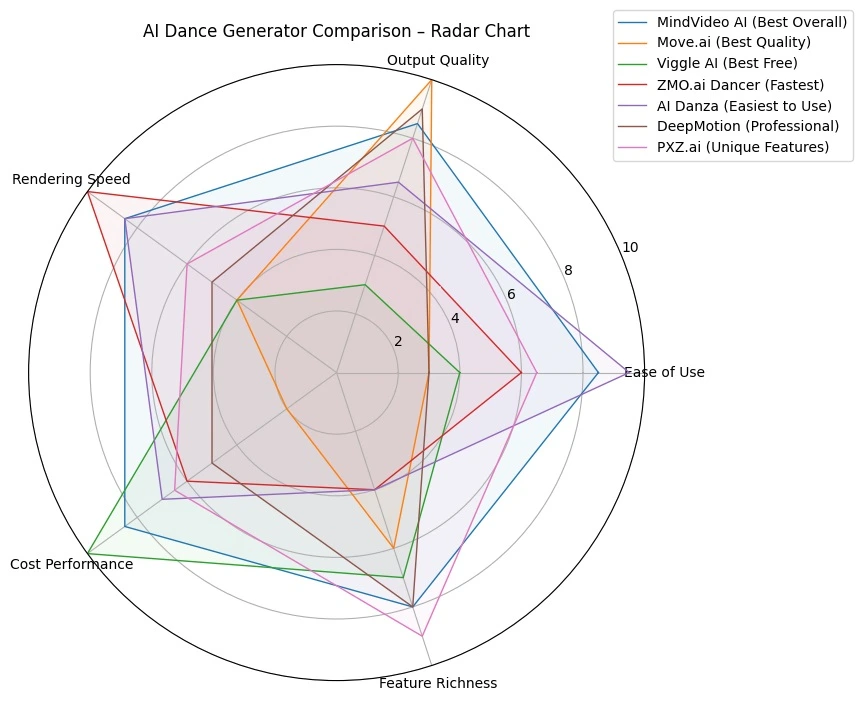
Text reviews are great, but charts give you an overview.
Multi-Dimensional Scoring Radar Chart
Scenario-based Recommendation Form
|
Your Needs |
Recommended Tools |
Reason |
|
High-volume social media creators |
MindVideo AI + Viggle AI |
Fast and trending streaming, ensuring quality and engagement. |
|
Professional content/advertising |
DeepMotion |
High-quality output and clear professional usage, ensuring precision. |
|
Personal fun and social sharing |
ZMO AI + AI Danza |
Free, simple, fun; perfect for sharing on mobile. |
|
Animators/developers |
DeepMotion + Move AI |
Acquire technical expertise for project needs, greatly enhancing development efficiency. |
|
Tech enthusiasts and early adopters |
PXZ AI + DeepMotion |
Cutting-edge 3D live-action technology and visual effects. |
Making AI Dance Videos from Scratch with MindVideo AI
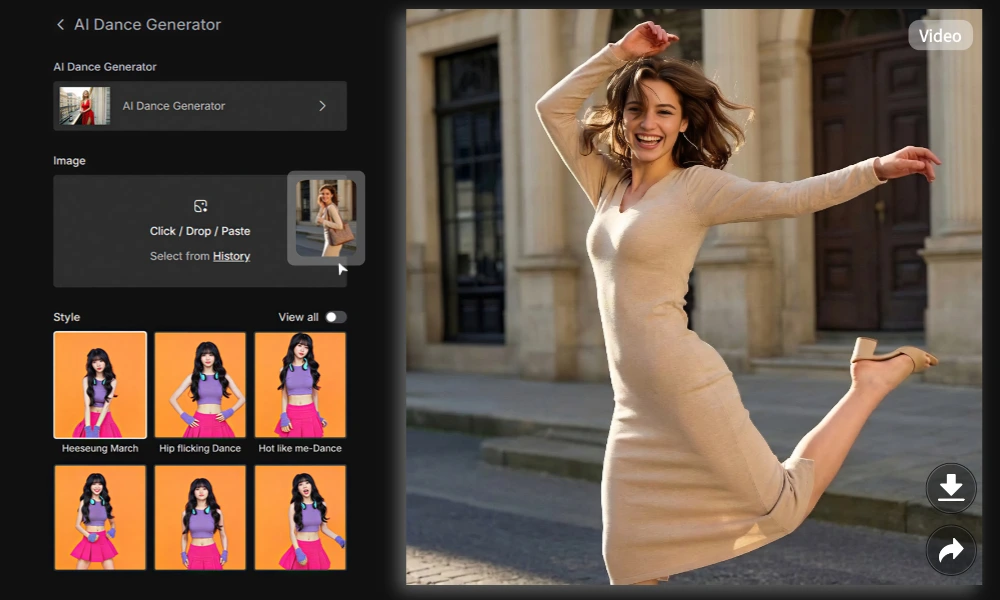
Let's see the theory, let's do it. I'm going to show you how easy it is to make an AI dance video with MindVideo AI, which we recognize as the "best overall" tool.
Step 1: Prepare your footage - the key to success!
The magic of AI starts with a good photo.
● Best photo requirements:
○ High resolution: at least 1080x1080 pixels, the clearer the details, the better the facial reconstruction.
○ Frontal, unobstructed: Make sure the face is facing the camera and not obscured by hair, hands, hats, or shadows.
○ Even lighting: Avoid strong side or backlighting, natural light is best.
● Examples of common mistakes: [Showing a photo with a sideways, blurry, or shadowed face] - Such a photo will cause AI recognition to fail or the face to be distorted.
Step 2: Upload and Setup
1. Visit the MindVideo AI website and log in to your account.
2. Click the "Create New Video" button.
3. In the upload area, click and select the photo you are ready to upload.
4. After successful upload, you will be taken to the template selection. Browse or search for your favorite dance template.
5. Click your favorite template, you can preview the dance effect.
6. After confirming that there is no error, click the "Generate Video" button.
Step 3: Optimize Output
The generation process usually takes 2-3 minutes. During this time, you can work on your next creation.
● How to improve the success rate? If the first generation fails or doesn't work well, changing to a better-lit, more positive photo usually solves 90% of the problems.
● Troubleshooting: If the generated video has a slight shaking of the character's face, try choosing a dance template with a smaller range of motion for more stable results.
Step 4: Download and Share
1. After the generation is completed, the video will appear in your "My Work" library.
2. You can directly click the download button, choose HD or SD format.
3. Suggestions for optimization of social platforms:
○ Soundtrack: When sharing to social platforms, use the platform's current popular music as BGM to get better traffic recommendation.
○ Copy: Use popular hashtags such as #AIDance #AIVideo #MindVideoAI.
💡 Pro Tip:
● Mass Production: While waiting for a video to be generated, you can continue to upload new photos and select templates to maximize efficiency.
● Creative Combination: Import AI-generated dance videos into video editing software and mix them with other footage to create more interesting content.
● Avoid Common Mistakes: Do not use group photos; AI can only process one face at a time.
 In-Depth Questions and Answers
How I Picked the Best AI Dance Generator: 5 Key Factors
During 40+ hours of testing, I didn't just look at whose videos were interesting, but evaluated them like a product manager, based on a weighted scoring system.
1. Output quality (40% weighting)
This is the most important factor. I focus on:
○ Smoothness of movement: Are the dance movements coherent, are there any jerks or unnatural jerks?
○ Naturalness of facial expression: Is the AI reconstructed face stiff? Does it convey any emotion?
○ Background and character integration: Are the edges of the characters clear, and are there any strange "halos" or blemishes?
○ Move AI scored the highest in this category, followed by MindVideo AI and PXZ.ai.
2. Ease of use (25% weight)
As powerful as a tool is, if it's like flying a space shuttle, it's worthless to most people.
○ Getting Started: How long will it take me to make my first video?
○ Interface Intuitiveness: Do I need to watch a tutorial to understand where the buttons are?
○ AI Danza and MindVideo AI tied for first place in this category.
3. Rendering Speed (15% weight)
In the fast-paced world of content creation, time is everything.
○ Measured rendering time: I recorded the average time it took each tool to generate a standard 15-second video.
○ ZMO.ai is the speed champion, but at the expense of quality. mindVideo AI strikes a good balance between speed and quality.
4. Pricing (10% weighting)
Value for money is key.
○ Value of the free version: Does the free version work? Or is it just "bait"?
○ Reasonableness of paid version: Is it worth paying for the improved functionality?
○ Hidden fees: Are there per-use fees or other hidden terms?
○ Viggle AI offers a great free experience, while MindVideo AI offers the best value for money.
5. Functionality and Features (10% weighting)
Besides the core features, what else makes it stand out?
○ For example, PXZ.ai's 3D generation, MindVideo AI's animal photo support, or DeepMotion's specialized data export. These unique features fulfill specific user needs.
Common Pitfalls and Guide to Avoiding Them
⚠️ 5 things to keep in mind before you buy:
● Watermark Limitations: Is the watermark on the free version huge and centered? This can seriously affect the usability of the video.
● Commercial copyright issues: If you plan to use it for marketing purposes, be sure to check the terms of service. The free versions of many tools (and even some paid versions) are for personal entertainment use only.
● Data privacy risks: How will the photos you upload be used? It is crucial to choose a reputable platform with a clear privacy policy.
● Hidden subscription terms: Some tools will lure you into a "free trial" but then automatically renew you with an expensive annual subscription. Be sure to read the terms and conditions.
● Misrepresentation of quality: Be wary of websites that only show "perfect" cases. My reviews are designed to reveal how they really perform on ordinary photos.
10 Creative Ways to Use AI Dance Generator:
● BRAND MARKETING CAMPAIGN: Make your brand mascot dance and launch a #brandname+dance challenge.
● Birthday/holiday wishes: Make your friend's photo into a dance video, it's a unique and funny gift.
● Turn your pet into an internet star: Continuously produce dance content for your family's "fur kids" to attract fans.
● Teaching demo: Teachers can use it to bring portraits of historical figures or scientists to life.
● Meme creation: Quickly turn online hot pictures into dynamic videos to seize the hot spots.
● Animate static products for e-commerce listings: Make your e-commerce products (such as dolls and dolls) "live".
● Icebreaker video: Play it during team introductions or the opening of online meetings to enliven the atmosphere.
● Generate dance animations for a VTuber avatar: Quickly generate dance animations for your VTuber or game character.
● Music video production: Indie musicians can create visual content for their songs at low cost.
● Bring old family photos to life with motion: Surprise your family by making a dance video of your grandparents from old photos.
Frequently Asked Questions
What is the best free AI dance generator for 2026?
Considering a combination of quality and speed of generation, cost-effectiveness, etc., I recommend MindVideo AI the most, which provides all templates open to free users to experience, in addition to its support for uploading photos of animals, making it an optimal choice for social media enthusiasts.
Can I use AI dance videos for commercial purposes?
It depends on the tool you use and its terms of service.
● Usually the free version of most tools explicitly states that it is for personal, non-commercial use only.
● The paid version of many tools grants a license for commercial use. For example, MindVideo AI's paid packages usually include a commercial license.
● Professional tools designed for business, whose primary customers are commercial companies, have licensing models designed for this purpose, but are also more expensive.
Be sure to read and understand the tool's license agreement carefully before using it for any commercial project.
How long does it take to generate an AI dance video?
Speed varies widely, from a few seconds to several minutes. Factors that affect this include: server load, video length, complexity of the chosen template, and your payment level (paid users usually have a priority queue).
Can I use cartoon or anime characters with an AI Dance Generator?
Yes, but the results vary. In my tests, Viggle AI and MindVideo AI are better with anime characters. This is because they include more stylized data in their model training. The key is to have images that look like "portraits", i.e., faces that are clear and structured. Overly abstract or stylized characters may cause the AI to fail.
Ready to Create Your First AI Dance Video?
Now you have all you need to know about the best AI dance generators, from free entertainment tools to professional-grade animation solutions. You no longer have to guess which tool really works.
Enough theory, it's time to start creating! If you're like me and are looking for a balance of efficiency and quality, then MindVideo AI is our go-to recommendation.
I can't wait to see your creative work! If you make interesting videos, don't forget to share them on social media and tag us so we can enjoy your masterpieces too. Have a great time!
