
5 Best AI Video Enhancers of 2026: Easily Upgrade Videos to 4K Quality
Do you have treasured family videos, such as your parents' wedding footage or clips from your children's childhood, gathering dust on your hard drive due to blurry image quality and dull colors? Or are you a content creator capturing wonderful moments with your phone or action camera (like a GoPro), only to be constantly bothered by annoying noise and shakiness? In this era of widespread 4K TVs and social media algorithms favoring high-definition content, low-quality videos not only affect the viewing experience but can also cause your work to drown in the sea of information.
Fortunately, AI technology has brought revolutionary solutions. However, with the market flooded with tools, from professional desktop software to lightweight online applications, finding the top ai video enhancer that truly suits your needs can be overwhelming.
Don’t worry—this video enhancer guide will clear the fog for you. We’ll delve into the core of ai video enhancement technology, comprehensively review mainstream tools, and reveal why MindVideo is becoming the preferred choice for both professionals and ordinary users alike.
Analyzing AI Enhancement Technology: How to Choose the Best AI Video Enhancer Tool
To learn how to choose a tool, you must first understand the underlying technology. What exactly is AI video enhancement? How does it differ from traditional filters? Simply put, it’s a complex computational process that uses deep learning models—similar to an experienced digital restorer—to analyze, understand, and intelligently “reconstruct” your video frame by frame.
This process is fundamentally different from merely overlaying a sharpening or brightening filter; AI genuinely creates new detail. A top-tier ai video quality enhancer typically possesses four core capabilities, which is why it’s considered an “essential tool”:
● Super-Resolution Upscaling: This is more than just stretching pixels. While traditional upscaling makes videos blurrier, AI super-resolution intelligently predicts and fills in missing pixel details by analyzing objects, textures, and edges. This means it can truly upscale your old 480p videos to a clear 1080p or even 4K, restoring incredible detail.
● Intelligent Denoising & Deblurring: Videos shot in low light are often full of digital noise. AI noise reduction models can accurately distinguish noise from authentic detail, effectively removing graininess while preserving clarity. For slight motion blur, AI can even perform deconvolution to restore sharpness.
● AI Color Correction & Enhancement: Old videotapes often suffer from color casts and degradation. AI can automatically analyze and correct white balance, contrast, and saturation to a natural, vivid state. It can even intelligently colorize black-and-white videos, a game-changer for historical archives.
● Frame Interpolation and Smoothing: Most videos run at 24 or 30 frames per second (FPS). AI frame interpolation technology intelligently generates new intermediate frames, boosting the video to 60 FPS or higher for silky smooth playback, especially in fast-moving scenes.
Understanding this, you’ll realize that a powerful tool to ai enhance video is not a single-function app, but a suite of cutting-edge algorithms working in concert.
In-Depth Review: The 5 Top AI Video Quality Enhancer Tools for 2026
Now that we understand the tech, let’s examine specific products on the market, starting with MindVideo, which offers a more accessible solution for everyone.
MindVideo AI
Pros:
No High-End Hardware Required: As a leading ai video enhancer free online, all calculations are processed on cloud servers. You don’t need an expensive graphics card; it works on any computer with an internet connection.
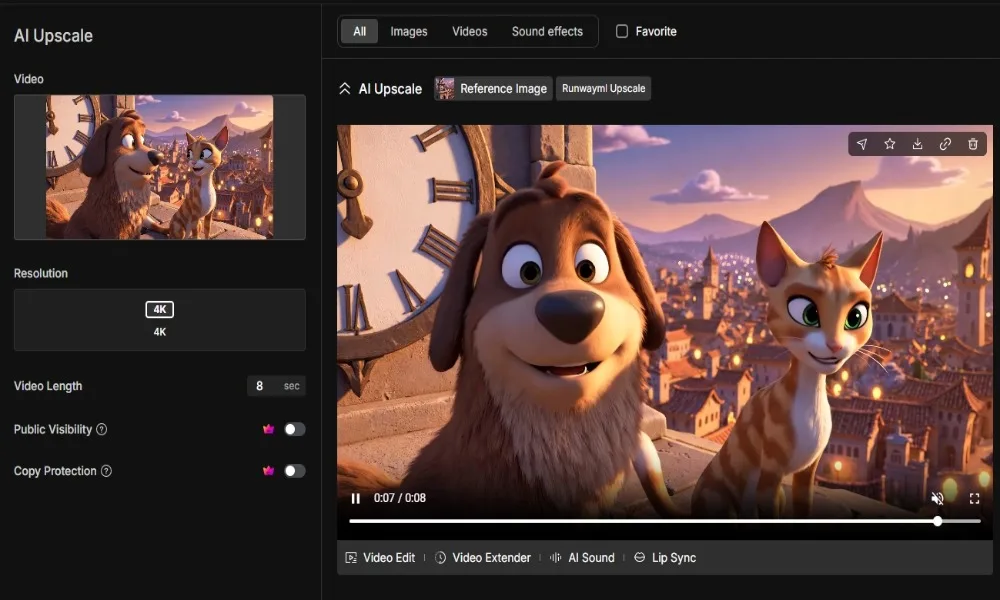
Ultimate Simplicity: The user-friendly interface allows for a near “one-click” operation. Simply upload a video, select a preset mode (e.g., “Upscale to 4K,” “Smart Denoise”), and achieve professional results with zero learning curve.
Cost-Effective: A generous free trial allows users to experience all features fully. The paid plans are far more economical than purchasing specialized software and hardware, making it arguably the best free ai video enhancer experience available.
Cons:
Requires a stable internet connection for uploading and downloading.
Customization options are more streamlined compared to desktop software, which might be a limitation for professionals needing granular control.
Topaz Labs
Pros:
Widely recognized as some of the best ai video enhancer software, its restoration capabilities, particularly in super-resolution and noise reduction, are top-class.
Offers a variety of AI models and numerous adjustable parameters, providing users with ample control.
Cons:
High Cost & Hardware Demands: The software is expensive and requires a powerful computer (especially an NVIDIA GPU), leading to a substantial overall investment.
Complicated Operation: The complex interface and multitude of parameters are unfriendly to novices, requiring significant time for learning and testing to achieve optimal results.
Time-Consuming: Processing a long 4K video can take hours, consuming all of your computer’s resources, even with top-tier hardware.
DaVinci Resolve
Pros:
A full-featured, professional-grade software for video editing, color grading, effects, and audio post-production. Its built-in “Neural Engine” provides powerful AI noise reduction and super-resolution capabilities.
Allows professionals already using DaVinci workflows to make enhancements seamlessly.
Cons:
Overwhelmingly Complex: If you just want to fix a video, this software is overkill, with a daunting learning curve.
Not a Dedicated Enhancer: While its AI is powerful, its primary focus is editing. Algorithm updates for enhancement may not be as frequent as dedicated tools. High hardware demands.
AVCLabs AI
Pros:
Similar to Topaz and HitPaw, it is focused desktop AI video enhancement software with a relatively simple interface, providing decent effects.
Supports simultaneous processing of multiple videos.
Cons:
Processing quality and speed depend heavily on local computer specifications.
Operates on a subscription model, resulting in high long-term costs. In terms of performance, it doesn’t significantly outperform Topaz and faces hardware and cost barriers.
CapCut
Pros:
As a popular free AI video enhancer available for both mobile and desktop, it is easy to use and suitable for quickly producing short videos for social media.
Cons:
Its picture quality repair function is basic, providing limited effects on severely blurred or noisy videos, and it cannot achieve professional-grade 4K super-resolution restoration. It serves more as a lightweight “beautification” tool than a true “repair” tool.
Review Summary:
Our comparison shows that while desktop software (Topaz, DaVinci) is powerful, it comes with high costs, hardware demands, and a steep learning curve. Lightweight apps (CapCut) don’t meet high-quality restoration needs. MindVideo effectively fills this gap, leveraging cloud technology to bring professional-grade AI restoration to everyone with minimal barriers.
Why is MindVideo the Best Choice for an AI Video Enhancer?
Based on the above reviews, several key reasons highlight why MindVideo stands out:
1. Powerful Cloud Computing, Zero Hardware Anxiety
Forget expensive graphics cards! As a leading platform to ai enhance video online, MindVideo handles all computations in the cloud. Whether you’re on an old laptop or a new MacBook, you get the same top-tier restoration results.
2. Ultimate Simplicity: AI Video Enhancement for Everyone
We believe powerful technology should be accessible. MindVideo eliminates complex settings. Simply upload your video, choose your goal (like “Upscale to 4K”), and let the AI do the work. This empowers anyone to get started easily.
3. Professional-Grade Results at an Affordable Price
In numerous blind tests, MindVideo’s restoration effects are comparable to desktop software costing many times more. Our generous free trial lets you experience this power without reservation, solidifying its place as the best free ai video enhancer to try.
4. A One-Stop, All-in-One Toolbox
Whether you need to improve resolution, denoise, or smooth motion, MindVideo meets all your needs in one place. No more juggling multiple complex programs.
Three Steps to AI Video Enhancement with MindVideo
Ready to witness the magic? Repairing your video is as simple as three steps:
● Upload Video: Open the MindVideo website and drag and drop your video file directly into the upload area.
● Select Mode: Clearly choose one or more enhancement modes according to your needs. For example, first select “Smart Noise Reduction,” then choose “Resolution Upgrade to 4K.”
● Preview and Download: After processing, you can drag the slider to see a real-time comparison before and after the repair. Once satisfied, click download to obtain your brand-new high-definition video!
The entire ai video enhancement process is simple, intuitive, and efficient.
FAQs
● Are there any good free AI video enhancers?
Many tools offer limited free versions. However, MindVideo provides a generous free trial that lets you test all its professional features, which is much more valuable. It is a premier free ai video enhancer experience.
● Can I repair video quality online for free?
Absolutely! MindVideo is a powerful ai video enhancer free online platform. No download is needed; just register to start your free trial immediately.
● Are AI video enhancers really that amazing?
Yes! A top ai video quality enhancer can transform a noisy, low-res 480p video into a sharp, clear version that looks like it was shot on modern equipment.
● How long does it take to process a video?
Processing time depends on video length and selected modes. However, because MindVideo uses high-performance cloud servers, it’s generally much faster than running the best ai video enhancer software on a personal computer.
Conclusion
In our search for the top ai video enhancer, we discovered that the true winners balance effectiveness, ease of use, and cost. While desktop software is powerful, its high barriers exclude many users.
MindVideo, with its innovative cloud-based model, successfully democratizes professional-grade AI video restoration. Whether you’re restoring precious memories or you’re a content creator seeking better quality, it’s the ideal choice.
Don’t let blurry images obscure your wonderful stories any longer!
Try MindVideo for free now and witness the miraculous transformation of your videos!
